dayanagt.ux@gmail.com
UT at Austin:
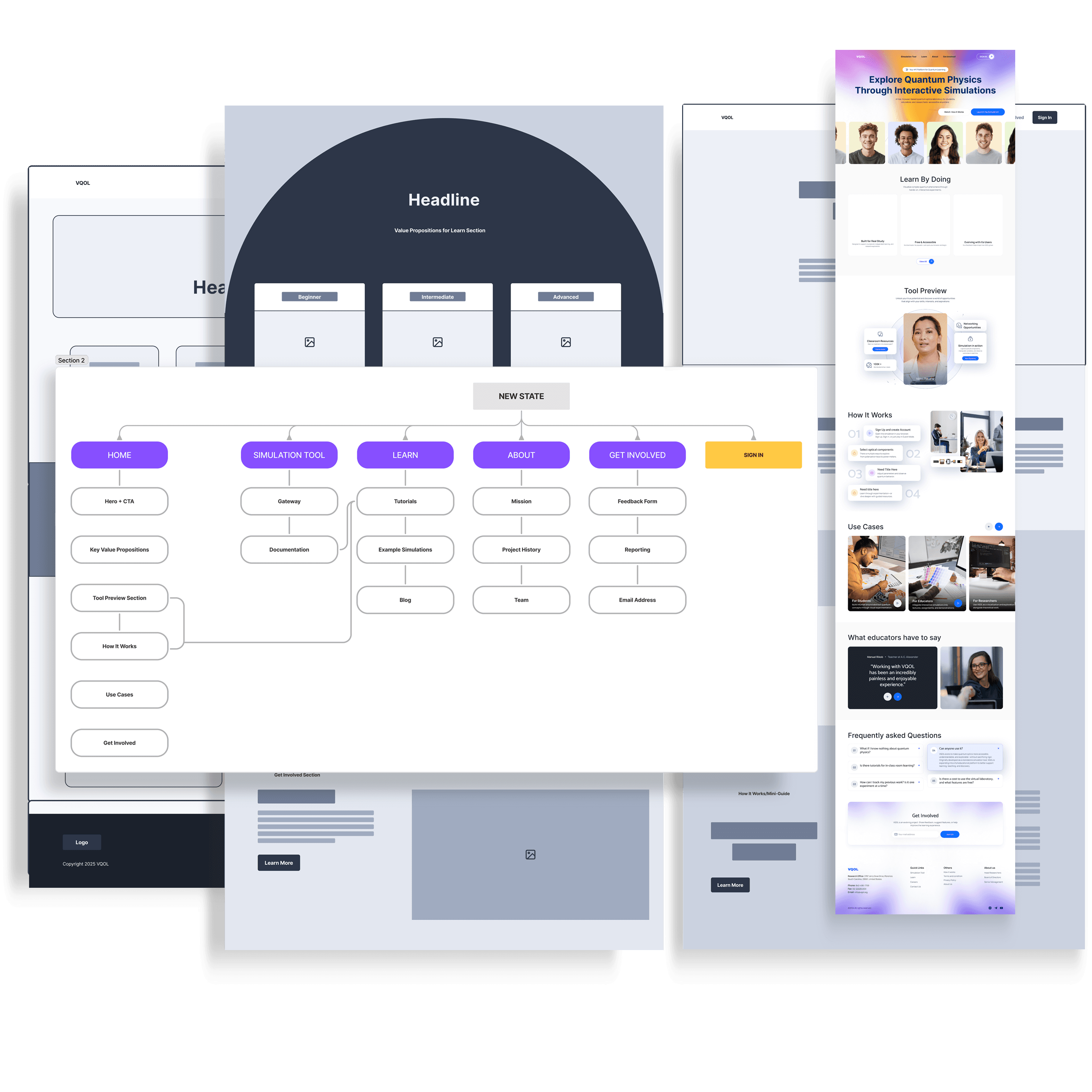
Website for VQOL Program
Transforming a Technical Tool into an Accessible Learning Platform.
Impact Goal
Increase new user engagement and reduce drop-off for novice learners by clarifying purpose and onboarding.
Business Context
VQOL was academically valuable but lacked a clear orientation, reducing discoverability and limiting educational adoption.
My Roles:
UX/UI Design
Content Strategy
Visual Design Direction
Product Owner
Case Study Sections:
Defining the Problem
The Design Process
Journey Map
Wireframes
Results
Next Steps
Defining the Problem
Students and educators struggled to understand the value and use of VQOL on first visit, leading to low first-time engagement and limited educational adoption. The absence of a guiding site structure inhibited learning progression and reduced retention metrics.
Constraints: High technical complexity, diverse audience (novices vs researchers), limited existing documentation.
Guiding principles:
01
Quality over quantity
Merge thin content into comprehensive resources.
Focus on exploration
Treat content as a living system that users can anticipate and explore.
02
03
Limit Navigation Paths
Avoid overwhelming users with too many navigation paths at once.
Content Audit
Because VQOL had minimal existing content, the audit focused on:
Identifying what already existed (simulation, documentation, feedback).
Evaluating what content was missing for first-time and non-expert users.
Determining how existing documentation could be reframed as learning material.
The Design Process
The goal was to find a balance between:
User goals
Understanding quantum concepts and how to use the tool.
Business goals
Encouraging tool usage, sign-ins, and feedback.
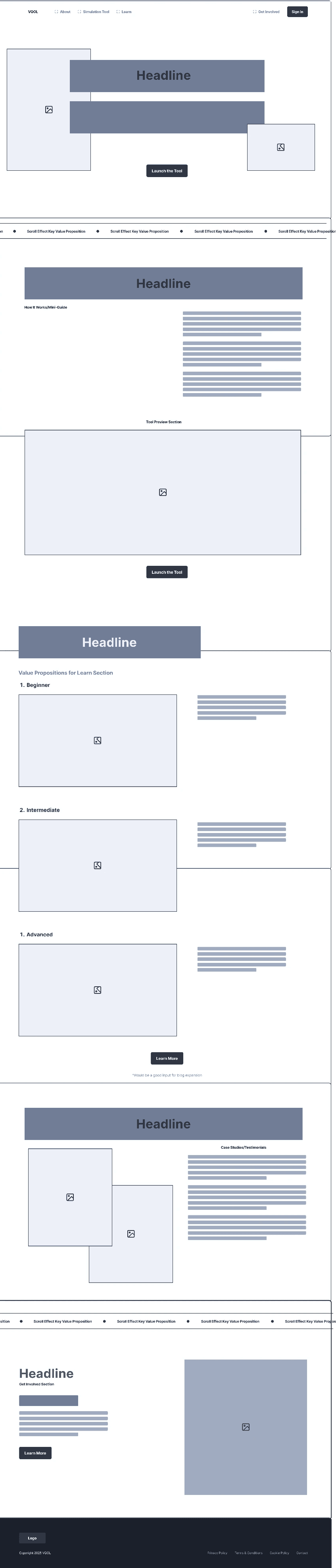
Landing Page Structure
Hero Section: Clear, benefit-driven headline and primary CTA (“Launch the Tool”).
Value Propositions: Interactive learning, research readiness, accessibility, and collaboration.
Tool Preview: Visual snapshot or animation of the simulation in action.
How It Works: Simple step-by-step explanation.
Testimonials / Use Cases: Educator and student perspectives.
Get Involved: Invitation to contribute feedback or participate in development.
Journey Map
The journey map was used to understand how first-time users—particularly students and educators—approach a highly technical tool with little prior context. Early touchpoints revealed confusion around where to start, what the tool does, and how simulations connect to learning goals.
Mapping this journey exposed two critical needs:
Clear orientation at entry to reduce intimidation and drop-off
Progressive disclosure of complexity, allowing users to build confidence before engaging with advanced simulations
These insights directly informed the site’s structure, ensuring users could move from understanding the purpose of VQOL to confidently launching simulations without unnecessary friction.
Information Architecture
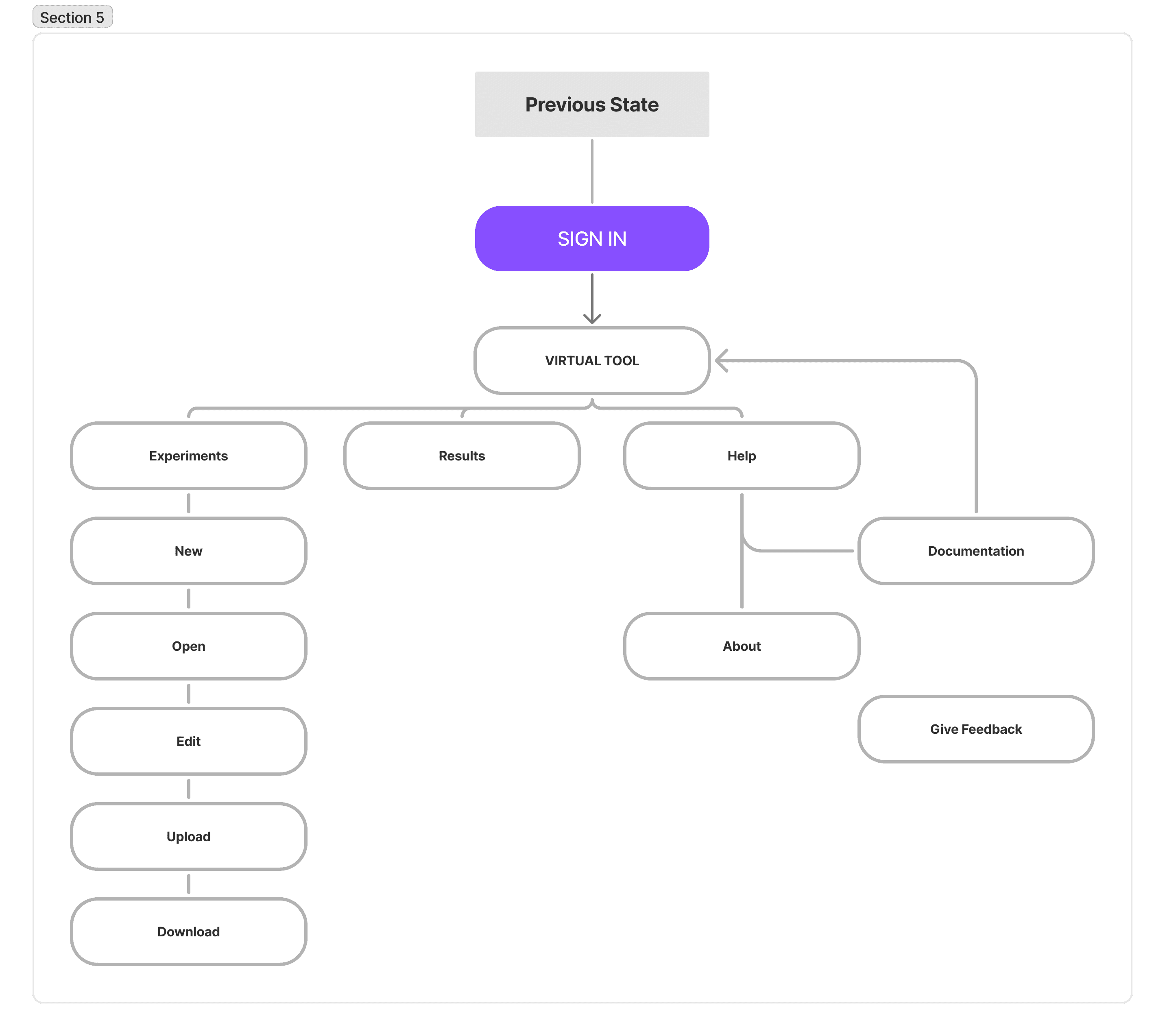
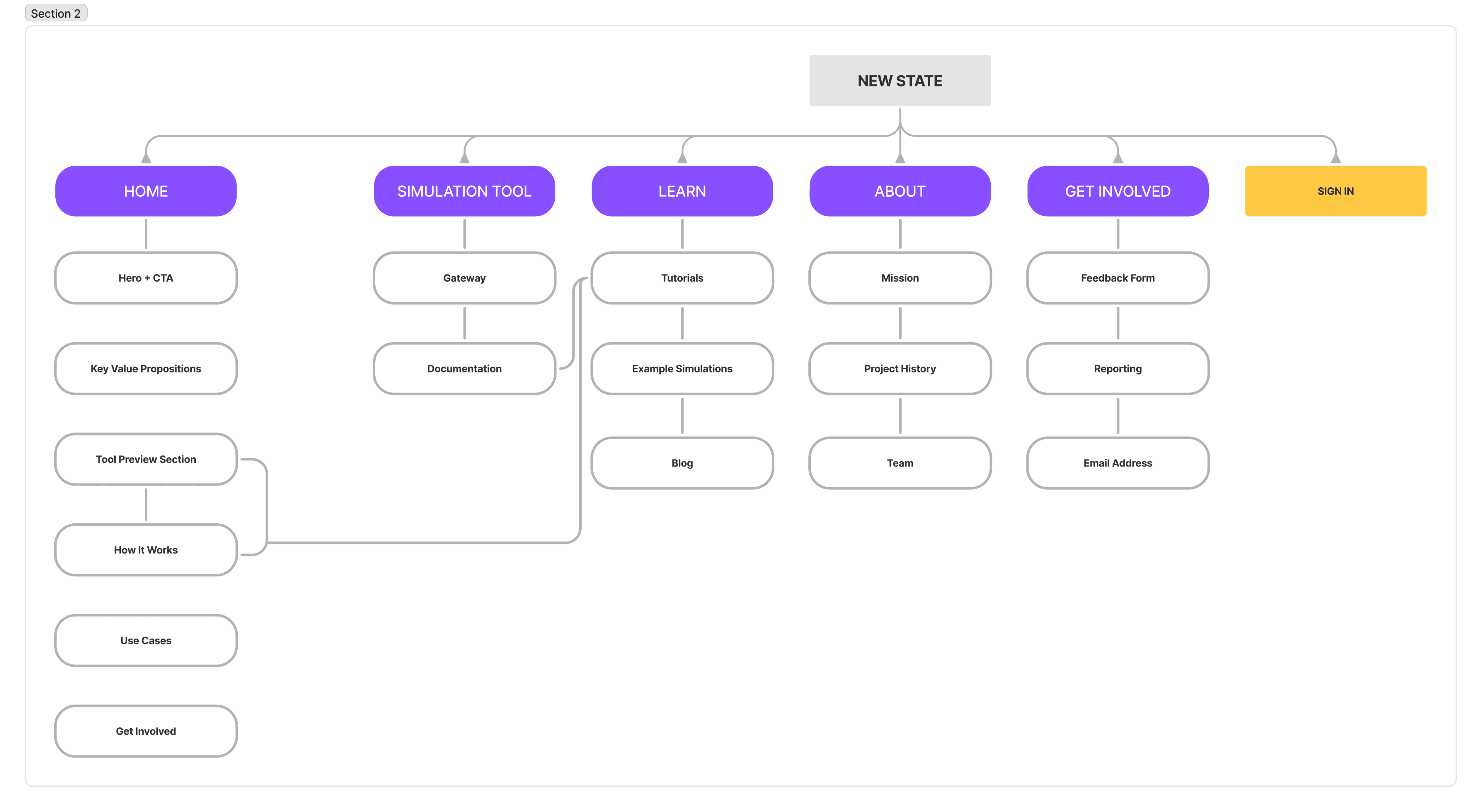
The site’s information architecture was designed to balance approachability with depth. Core concepts and guidance were surfaced early, while advanced documentation remained accessible without overwhelming first-time users.
This structure supports multiple user paths:
Learners seeking guided exploration
Educators looking for instructional resources
Advanced users navigating directly to simulations and documentation
Wireframes
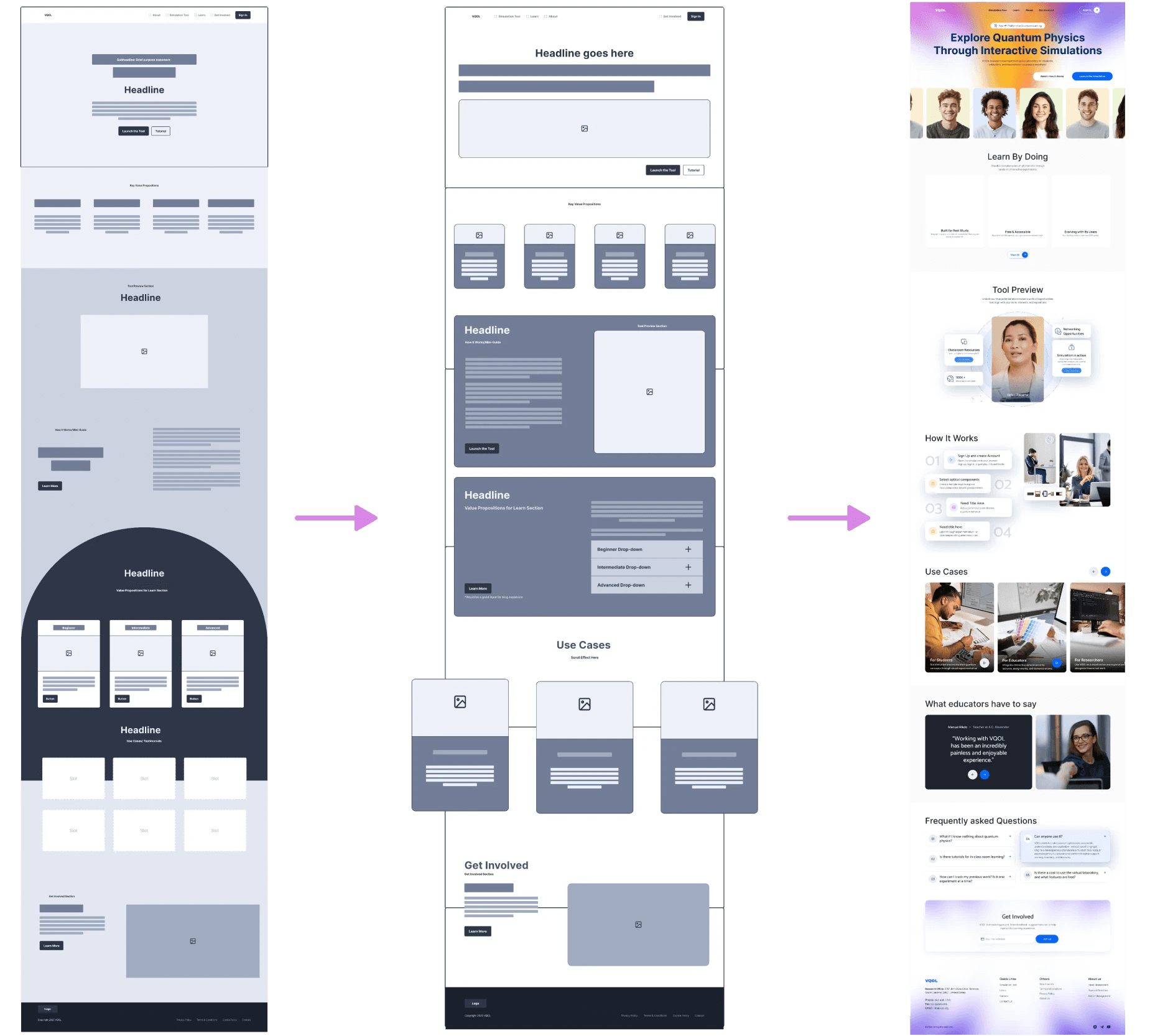
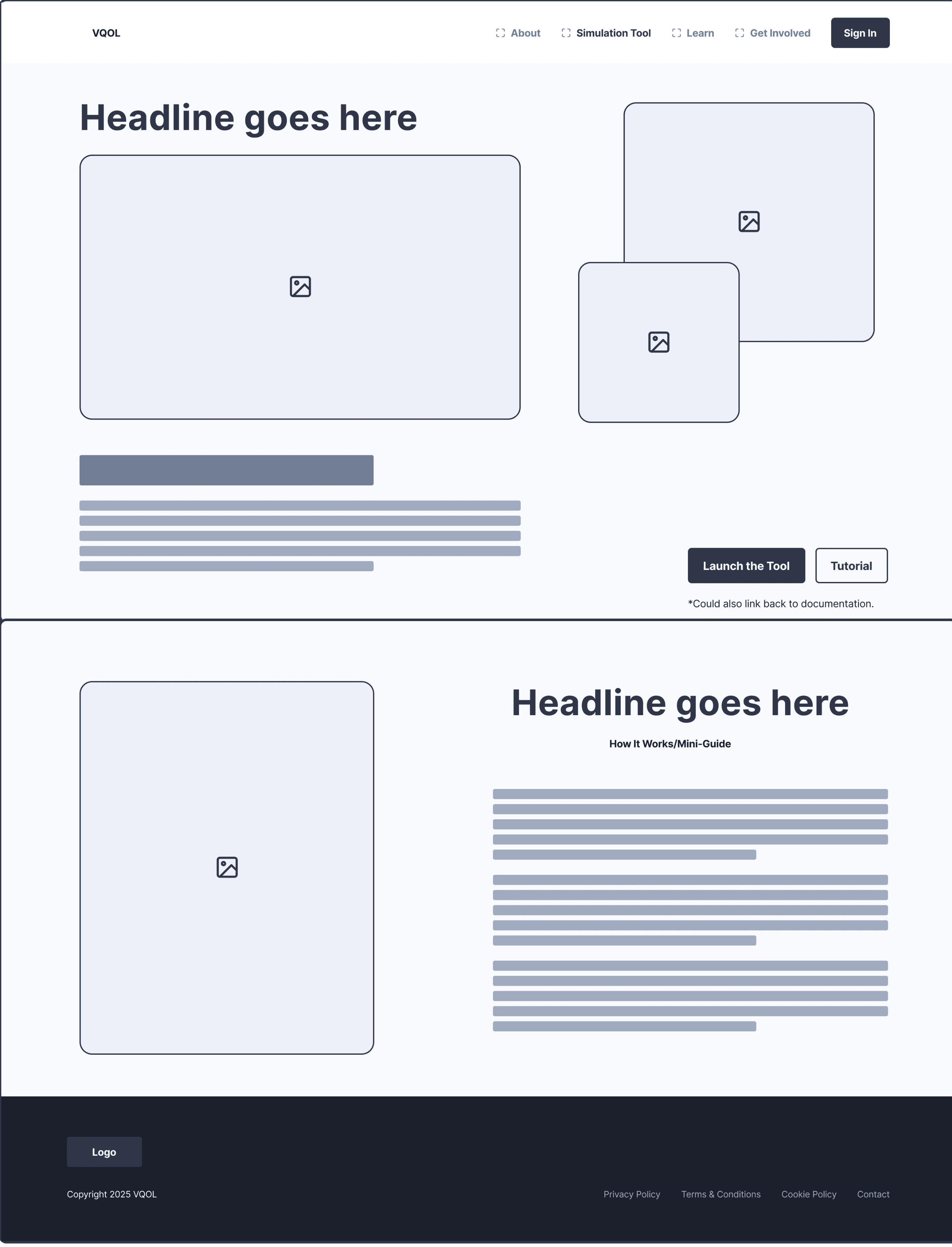
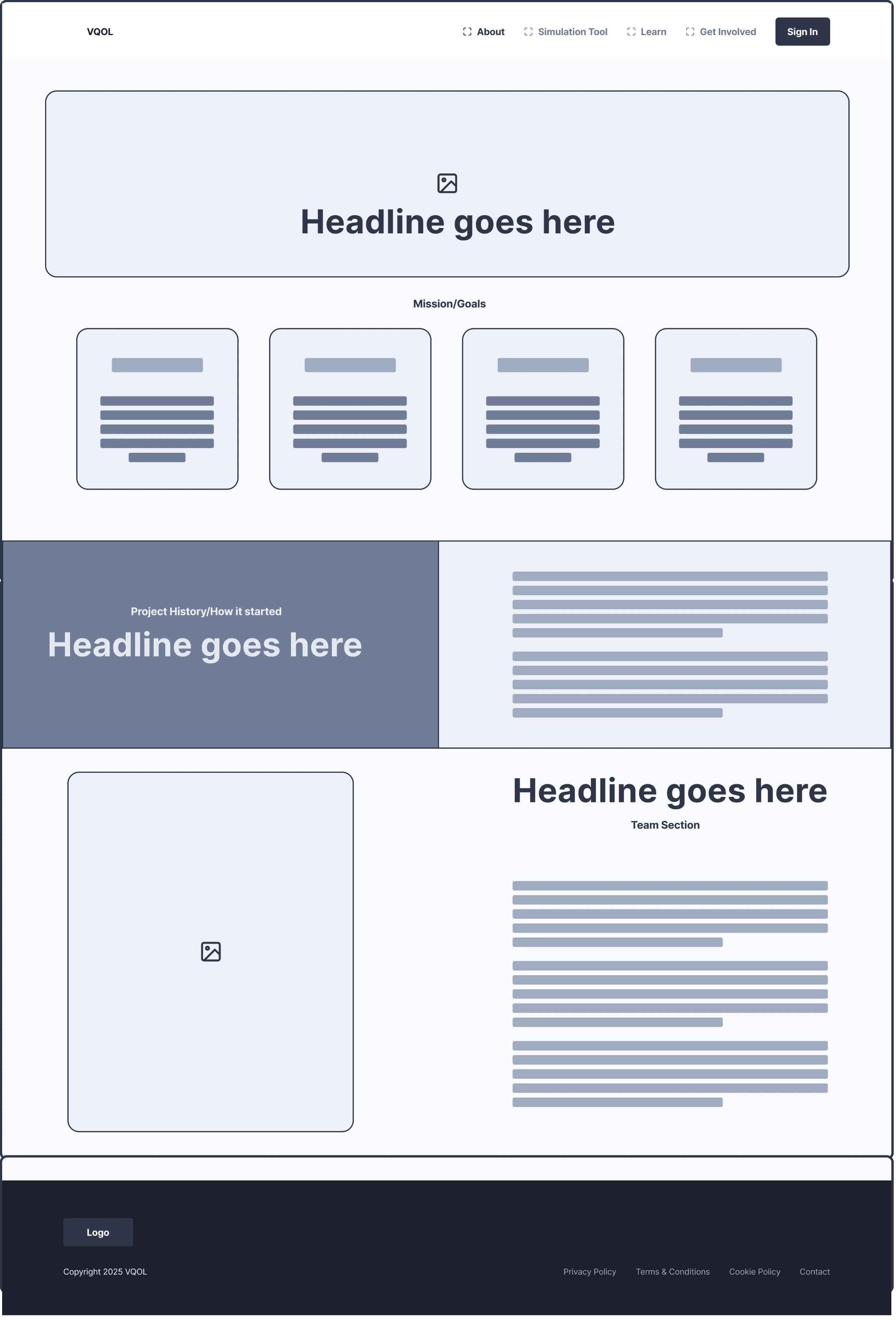
Wireframes focused on clarity, hierarchy, and confidence-building. Early iterations explored multiple layouts to determine how much technical information to surface upfront without discouraging new users.
Key wireframe decisions included:
Prioritizing clear value messaging and entry points before technical depth
Structuring content to guide users toward their first simulation
Reducing visual noise to support scanning and comprehension
Through iteration, the layout evolved to support faster understanding while maintaining credibility for advanced users—reinforcing trust without sacrificing accessibility.
Design in Stages
Key Tradeoffs
To make VQOL approachable, some technical depth was intentionally deferred until users expressed readiness. This prioritized early engagement and learning confidence over immediate completeness.
Design Decisions & Rationale
Hero + onboarding workflow
Decision: Lead with a context-setting hero with headline, value props, and CTA.
Why: Early interaction research revealed users were unsure how simulations related to learning goals — so we prioritized orientation before tool access.
Tradeoff: Limited initial technical depth to reduce first-visit intimidation.Progressive disclosure
Decision: Defer advanced documentation until users commit to exploring learning paths.
Why: Confusion in early user flows made depth too overwhelming without context.
Tradeoff: Educators may want complex info upfront, so we added a clearly labeled “Advanced Resources” path.
Results
Primary Outcomes
The redesigned VQOL experience was structured to improve first-time user comprehension, engagement, and adoption by addressing early-stage friction and cognitive overload.
Key projected impacts include:
Increased first-time simulation engagement
By introducing a contextual landing experience and guided entry points, the design was intended to increase the percentage of users who successfully launch a simulation during their first session.Reduced time to first meaningful action
Clear value messaging, simplified navigation, and progressive disclosure were designed to shorten the time between arrival and first interaction with the simulation environment.Lower early-session drop-off
Structuring content into learning-oriented pathways aimed to reduce confusion and bounce rates for novice users unfamiliar with quantum physics concepts.
Design Decisions KPIs
Design Decision
Context-setting hero and onboarding flow
Progressive disclosure of technical content
Guided learning pathways
Clear CTA hierarchy
Unified site + tool ecosystem
Intended Outcome
Improve clarity of product value
Reduce cognitive overload
Support novice users
Encourage exploration
Reduce fragmentation
Projected KPI
Increased first-session engagement rate
Reduced bounce rate on entry pages
Higher completion rate of initial learning steps
Increased click-through to simulations
Shorter time to first simulation launch
Validation Plan
Success would be evaluated through analytics and usability testing, focusing on time to first simulation, session drop-off rates, and task completion. Qualitative feedback from students and educators would be used to validate clarity, learning progression, and perceived confidence when using the tool.
Next Steps
Expanding this work toward a live product environment would focus on validation, performance measurement, and iterative refinement.
01
Usability & Accessibility Testing
Conduct tests with students and educators to validate onboarding flows, identify friction, and iterate based on real behavior.
02
Educator Interviews
Interview instructional users to align content structure with classroom use cases and curricular needs.
03
Iteration Opportunities
Improve how advanced documentation surfaces based on use patterns and support analytics.
04
Metrics & Success Indicators
Track time to first simulation, tutorial completion, and repeat visits to guide design optimizations.
All rights reserved by Dayana Gonzalez Theresine