dayanagt.ux@gmail.com
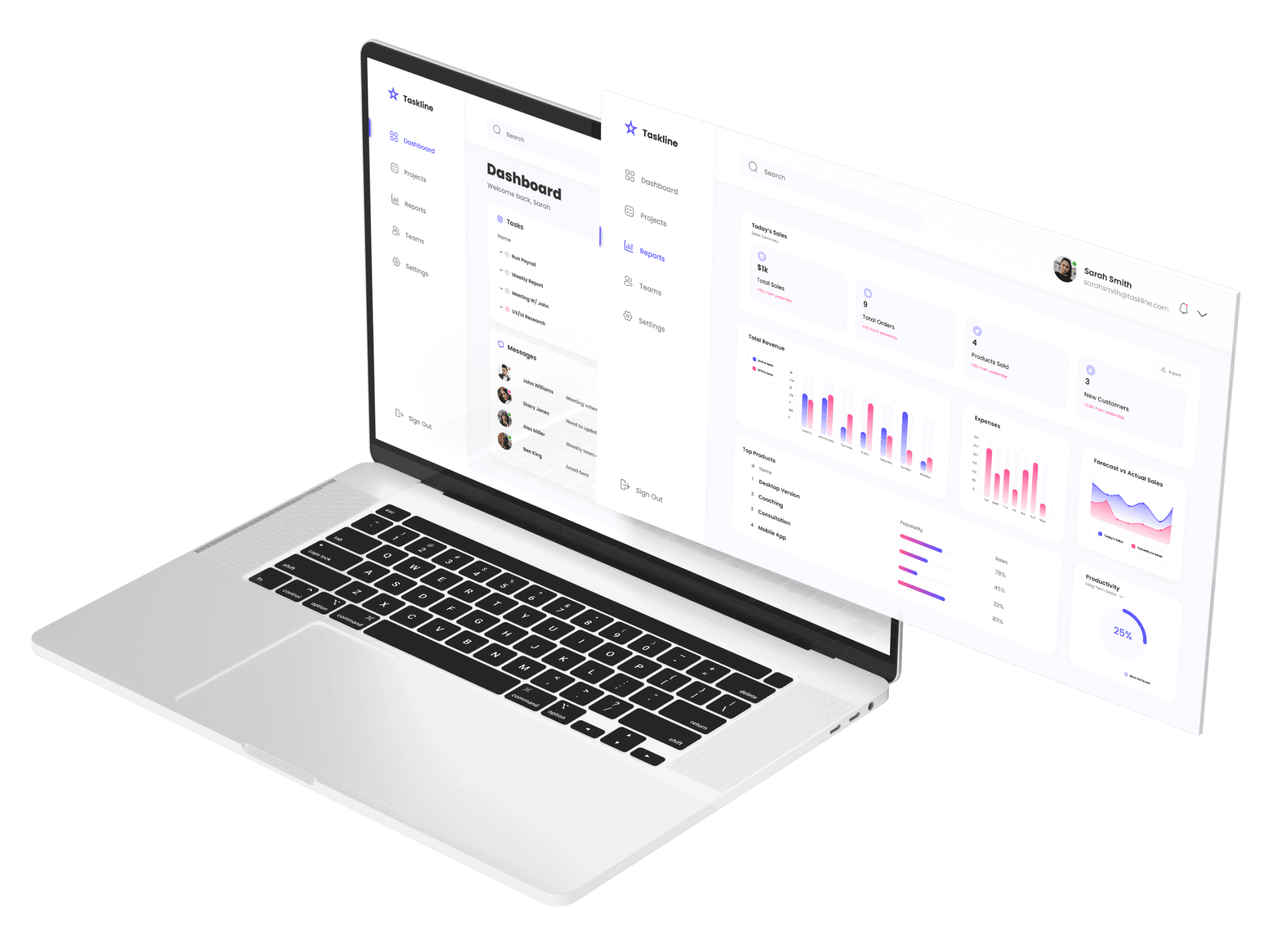
A unified productivity and performance platform designed to help teams plan work, execute efficiently, and make data‑driven decisions.
Self‑initiated project demonstrating end‑to‑end product design, UX strategy, and dashboard thinking.
Project Type
Conceptual / Portfolio Case Study
Productivity & Task Management Dashboard
My Roles:
UX/UI Design
UX/UI Design
Information Architecture
Content Strategy
Researcher
Visual Design Direction
Product Owner
Case Study Sections:
Defining the Problem
Market Research
Competitive Analysis
Personas
Design Guide
Journey Map
Wireframes
Results
Fragmented Tools, Fragmented Work
Work and performance data were scattered across multiple tools, forcing teams and managers to context‑switch and manually correlate information. This created:
Lack of real‑time visibility into team and project performance
Difficulty in tracking progress across tasks, deadlines, and outcomes
Disconnected sales and productivity data, blocking meaningful analysis
Tools that prioritized features over clarity, leading to cognitive overload and poor adoption
In modern teams, these issues reduce efficiency, slow decisions, and diminish trust in tools that are meant to enable work rather than complicate it.
Defining the Problem
Research
Market Research
0
4 B
6 B
2 B
10 B
2026
2028
2030
2024
2024: The dashboard software market was valued at approximately $3.7 billion.
2030/2031 Projections: Estimates range, with some forecasting over $10 billion by 2031, growing at 8-14% CAGR.
The Claim
Research suggested an opportunity for a unified platform that combines task management, team visibility, and performance reporting without overwhelming users.
Research Insight
Research and competitive analysis revealed that while many productivity tools offer robust functionality, they often fail at prioritization. Users cared less about seeing everything and more about understanding what mattered now.
This insight directly informed the dashboard’s information hierarchy, where primary actions and high-priority tasks are surfaced first, while secondary data remains accessible but unobtrusive.
Competitive Analysis
Market Landscape
Competitive analysis revealed key gaps:
Most platforms focused narrowly on either task management or reporting rather than both.
Dashboard interfaces were often cluttered, overwhelming users with too much data.
Existing tools assumed familiarity, creating steep learning curves for new users.
Industry data shows dashboards are a central tool for decision‑making, with a strong trend toward integrated platforms that balance task execution with performance insights — an opportunity for differentiation.

Monday.com
Salesforce
nTask
The Good
Centralized Information: Consolidates tasks, projects, and metrics into one view, reducing tool-switching.
Enhanced Productivity: Helps users prioritize tasks, track progress, and stay organized.
Data-Driven Decisions: Offers metrics and reports that support strategic decisions for teams and managers.
Collaboration Support: Enables team members to share updates, assign tasks, and coordinate workflows.
The Bad
Overwhelming Complexity: Too many features, charts, or modules make dashboards confusing and hard to navigate.
Cluttered Interface: Dense layouts and poor organization make it difficult to find relevant tasks or insights quickly.
Steep Learning Curve: New users struggle to understand the system without extensive onboarding.
User Comments in Platform Reviews
Mark O.
Last year, we decided to give Monday.com a try in order to improve our workflow and streamline our daily tasks. But it is difficult to schedule recurring tasks.
Amy T.
Salesforce. is a great platform when it is up and running. At first I loved the flexibility it provided to create a sales system that worked specifically for my team but it requires tons of maintenance to keep it going.
Stephen M.
nTask platform is great. The collaboration tools make communication simple. I find some of their real time reporting tools lack depth and their advanced tools are overwhelming to get started with.
User Survey
User survey was conducted to gain a deeper understanding of how individuals interact with productivity and team management dashboards, including how they organize tasks, track progress, and make decisions based on reporting. By identifying common workflows, pain points, and top concerns, the survey informed design decisions that prioritized usability, clarity, and efficiency, ensuring the platform addressed real user needs rather than assumptions.
Defining Potential Users
Team Member
Focused on completing tasks, tracking personal progress, and collaborating with colleagues.
Project Manager
Manages multiple projects, timelines, and dependencies, requiring a high-level overview of task and team status.
Team Lead
Oversees team workloads, assigns tasks, and monitors performance to ensure goals are met.
Stakeholder
Reviews sales, productivity, and performance metrics to make strategic decisions and assess ROI.
This informed a persona spectrum that prioritized both immediate usability and strategic oversight.
The Design Process
Design Goals
Build a single platform where teams could:
Plan and execute work with clarity
Collaborate effectively
Understand performance through intuitive reporting
Guiding Principles
Clarity over complexity
Surface essential information and avoid feature overload
Actionable visibility
Metrics should drive decisions, not just display data
Scalable architecture
Interface components should grow with feature expansion
Design Guide
Font
Poppins
Regular
Medium
SemiBold
AaBbCcDdEeFfGg
AaBbCcDdEeFfGg
AaBbCcDdEeFfGg
Medium
SemiBold
Regular
Subheader
Header
Body Copy
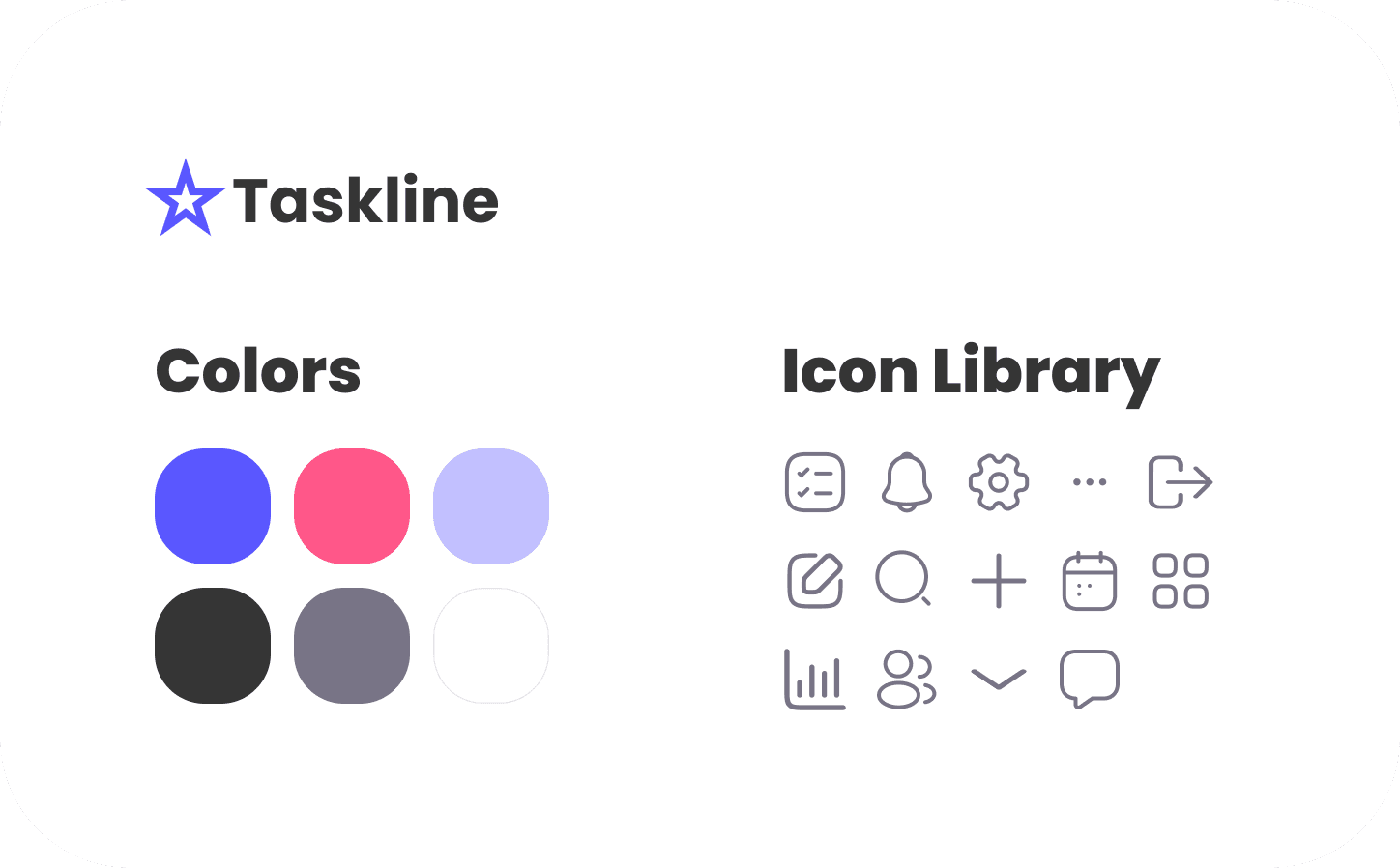
The design guide was created to ensure consistency across the platform, streamline future updates, and provide a clear reference for visual and interaction patterns, supporting both usability and scalability.
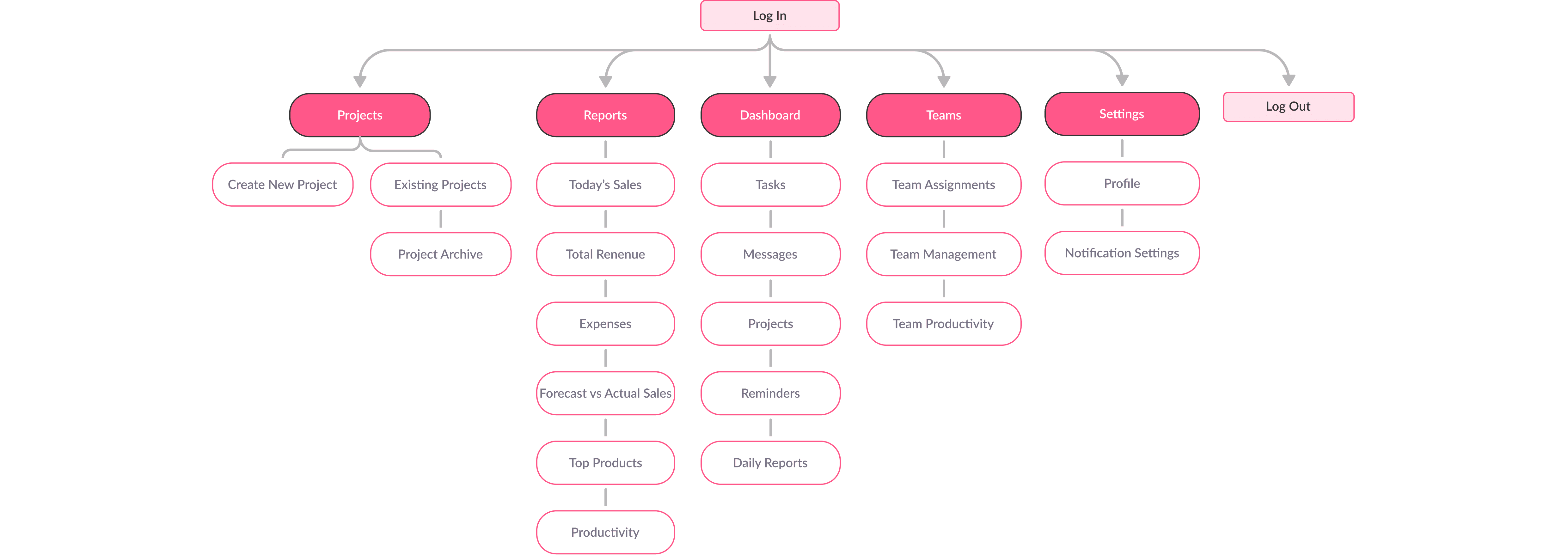
Information Architecture
Decision
Consolidate fragmented tasks, collaboration, and reporting into logical sections with clear navigation.
Rationale
Users struggled when tools scattered their context; grouping related areas reduced switching costs.
Outcome
A scalable framework that prioritizes findability and logical flows.
Journey Map
Personas and journey mapping highlighted a common frustration across user types:
Difficulty maintaining momentum when tasks, deadlines, and progress indicators were scattered across tools.
These insights shaped the dashboard’s layout, emphasizing:
Clear task prioritization
Visible progress indicators
A balance between individual productivity and team-level awareness
Design in Stages

Early wireframes explored multiple layout approaches to balance density with readability. Through iteration, I refined the layout to ensure key information could be scanned within seconds, while deeper insights remained available without overwhelming the user.
Tradeoffs were made to limit surface-level data in favor of clarity, reinforcing the dashboard’s role as a decision-making tool rather than a data dump.
Results
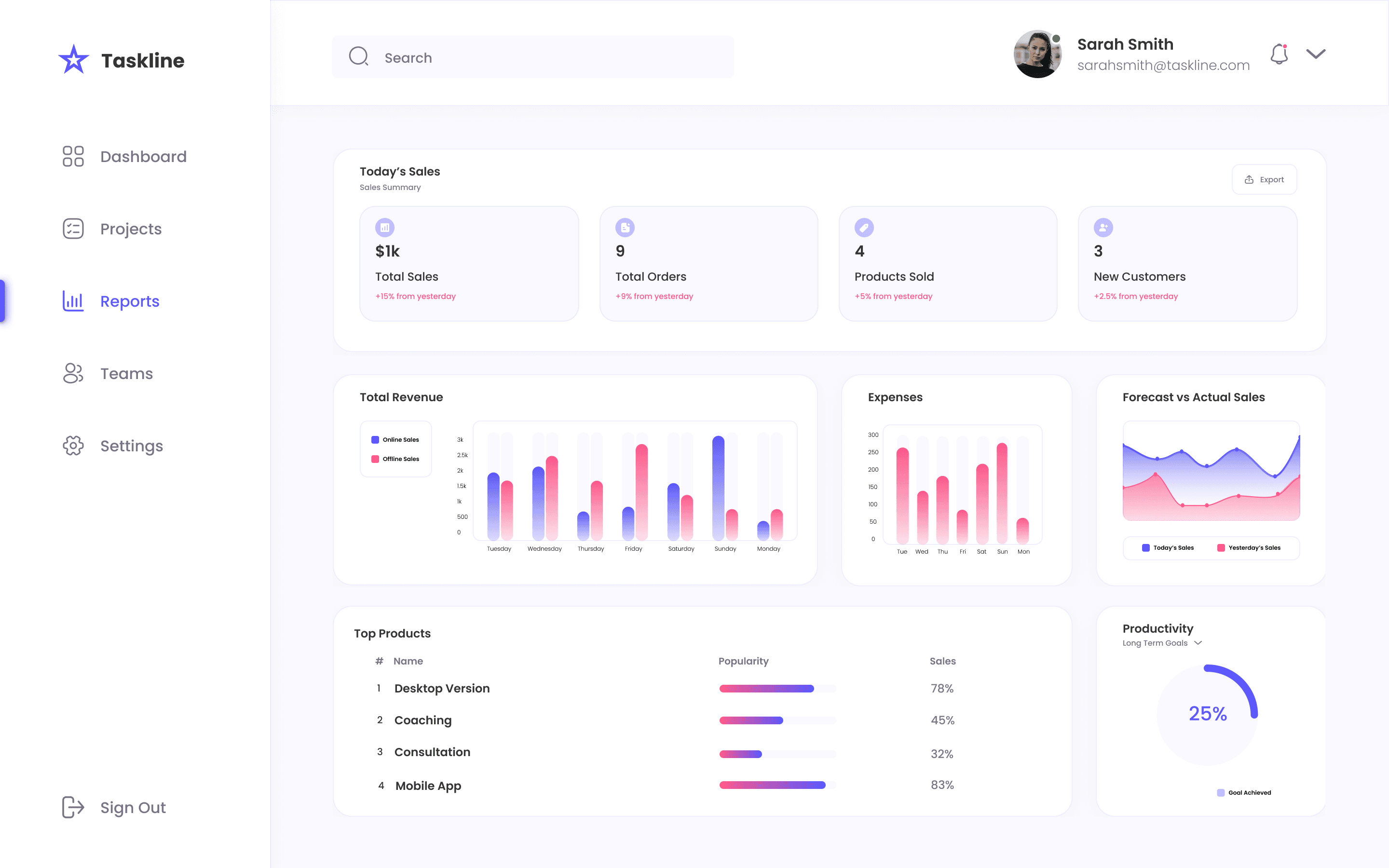
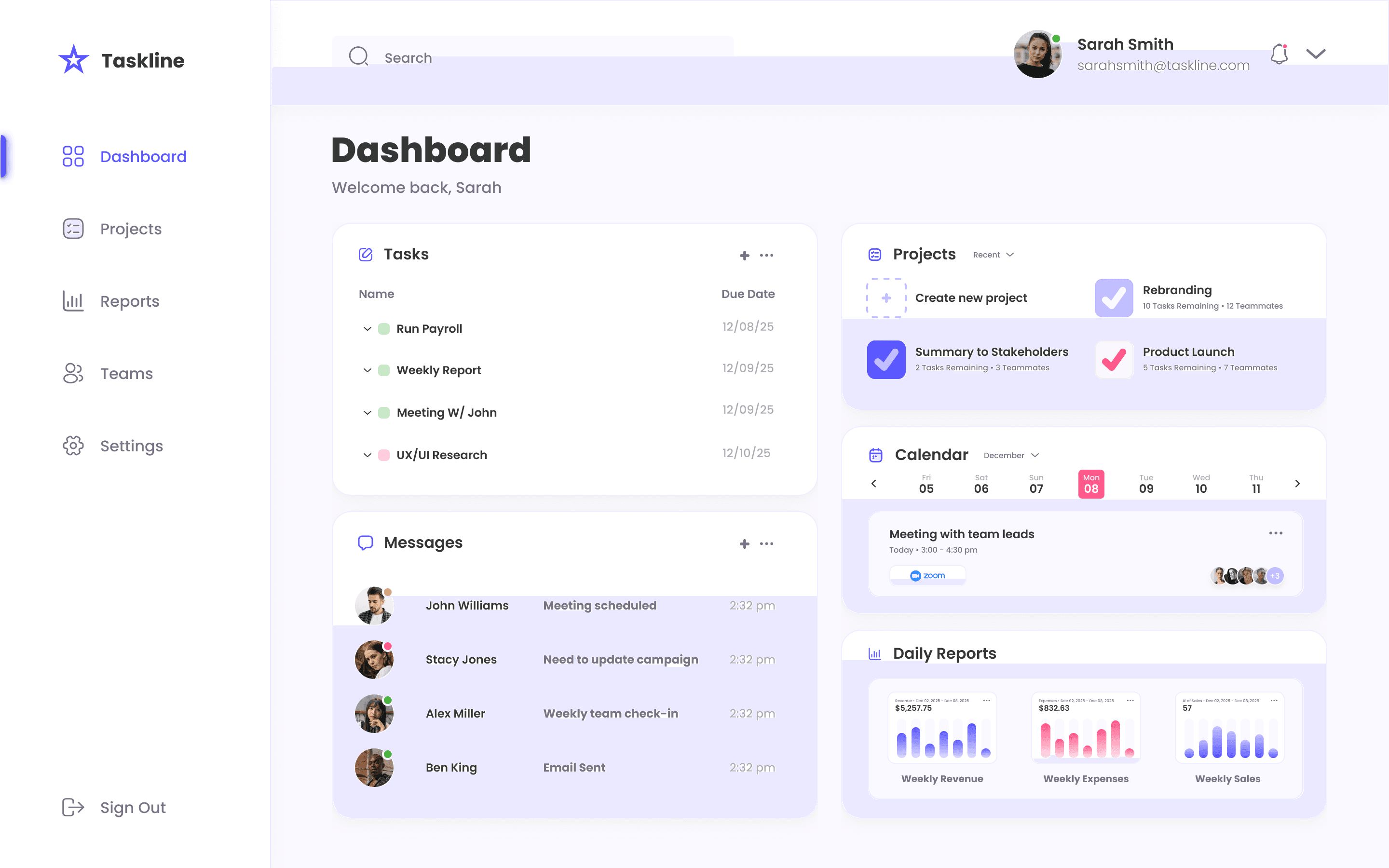
The final dashboard delivers a unified experience that surfaces priorities, tracks progress, and supports both individual and team workflows. By consolidating tasks and performance indicators into a single view, the design reduces friction and enables users to focus on execution rather than navigation.
The system was designed to scale across platforms and use cases, laying the groundwork for future expansion into mobile and growth-focused experiences.
Impact & Value (Projected KPIs)
Because this is a conceptual project, outcomes are framed as visions tied to design decisions
Design Decision
Unified information architecture
Persona‑grounded prioritization
Consistent design system
Data‑driven reporting views
Intended Outcome
Reduce tool switching and cognitive overhead
Align interface with real user goals
Improve usability and reduce friction
Support team and executive decisions
Projected KPI
Increased core workflow engagement
Higher task completion rate
Fewer navigation‑related errors
Increased confidence in performance metrics
Validation Plan
Post‑launch, success would be measured through usability testing (navigation efficiency, task completion) and analytics (engagement on dashboards, frequent key flow drop‑off). Insights would guide iterative refinement.
Reflection & Next Steps
If this dashboard were to move into a production environment, the next phase would focus on validation, iteration, and scalability:
Usability Validation
Conduct moderated usability testing with individual contributors and team managers to validate information hierarchy, task prioritization, and scan-ability of key metrics.Behavioral Analytics & Success Metrics
Introduce product analytics to measure task completion time, feature engagement, and frequency of dashboard usage to identify friction points and opportunities for optimization.Role-Based Views & Personalization
Explore customizable dashboards tailored to different user roles (e.g., individual contributors vs. managers) to ensure relevant data is surfaced without increasing cognitive load.Design System Integration
Formalize dashboard components into a scalable design system to support faster iteration, consistency across platforms, and future product expansion.
All rights reserved by Dayana Gonzalez Theresine